 Slow Down
 A free Transcribe! alternative that runs in your browser
Transcribe! is a long-standing, much-loved desktop app for working out music by ear. If you want the core practice tools for free, with nothing to install and on your phone too, Slow Down Buddy covers them right in the browser.
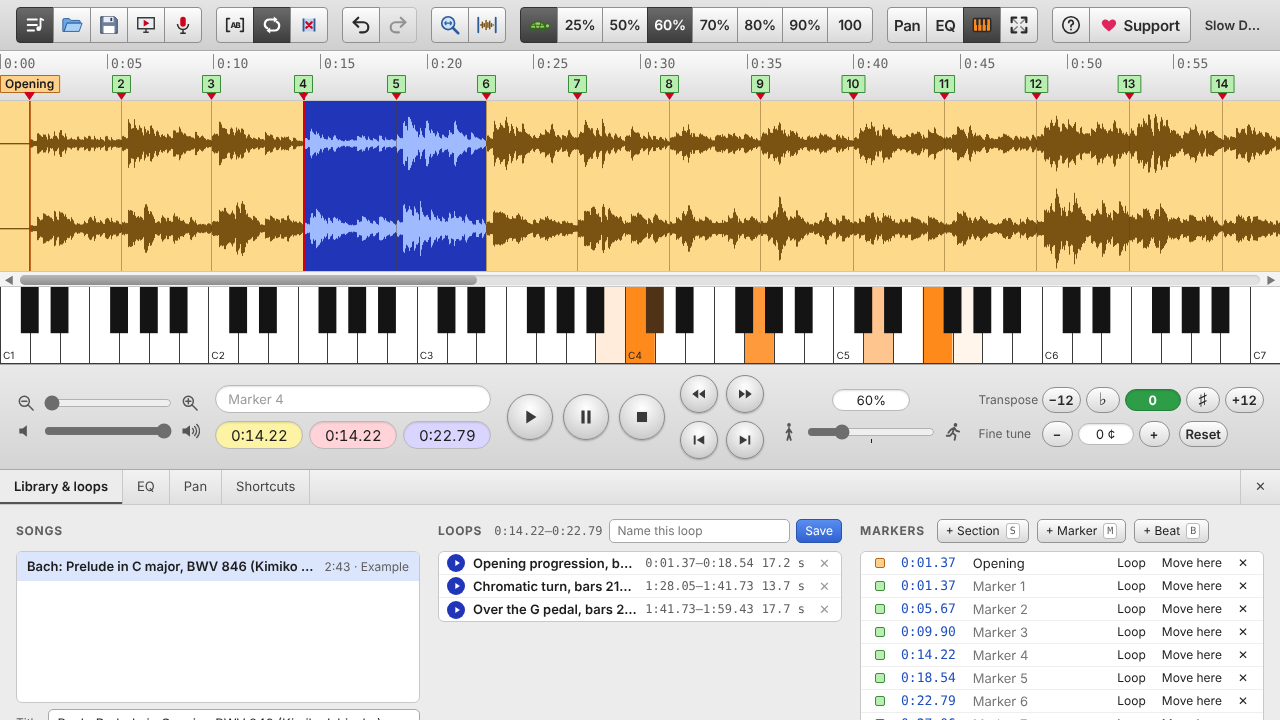
What you get in Slow Down Buddy
- Slow down without changing pitch, from 25% to 200%, with presets for 25, 50, 60, 70, 80 and 90%. Drum hits and note attacks stay crisp even at quarter speed.
- Loops by ear: press L at the start of a passage and L again at the end, or drag across the waveform. Save loops with names and jump between them.
- Section, bar and beat markers you can tap in while the song plays, drag and rename.
- Transpose and fine-tune: shift by semitones and by cents to match a detuned recording or your instrument.
- EQ and channel tools: boost the bass, cut the cymbals, play the left or right channel alone, or cancel the center to reduce the vocal.
- Keyboard view that lights up the notes sounding at the playhead.
- Record from any website in Chrome, Edge or Brave: pick a browser tab and the audio goes straight into your library.
- Opens almost anything: MP3, WAV, FLAC, M4A (including Apple Lossless), MP4 video and voice memos, even on iPhone.
- Undo for everything, plus one-file backups to move your library between devices.
Side by side
| Slow Down Buddy | Transcribe! | |
|---|---|---|
| Price | Free | Paid license, with a free trial |
| Where it runs | Any modern browser: Mac, Windows, Chromebook, iPhone, iPad | Desktop app for Windows, Mac and Linux |
| Slow down without changing pitch | Yes, with crisp attacks at slow speeds | Yes |
| Loops and markers | Yes | Yes |
| Transpose and fine-tune | Yes | Yes |
| EQ, left/right, vocal reduction | Yes | Yes |
| Record audio from a website | Yes, from a Chrome, Edge or Brave tab | Opens files from your computer |
| Video | Plays the audio of video files | Shows video alongside the audio |
Where Transcribe! is still stronger: it shows video, has more detailed note and spectrum analysis, and has been refined over many years as a desktop tool. If those matter to you, it is well worth its price. If you want something free that you can open on any device in seconds, start with Slow Down Buddy.
Switching over
- Open slowdownbuddy.com and drop a song onto the page (or press the folder button).
- Pick a practice speed, then press Space to play. Playback always starts from a loop that's on, or from where you last pressed Play.
- Press L, L to loop the tricky part, and M to drop markers as you go.
- Use Back up library now and then: your songs live in the browser, and a backup file moves them to another device.
Questions
Is Slow Down Buddy really free?
Yes. Everything described here is free with no sign-up. A Pro version with extras such as exporting slowed-down audio is planned; the current features stay free.
Can it open the same files as Transcribe!?
It opens MP3, WAV, FLAC, M4A (AAC, Apple Lossless and Opus), the audio of MP4 and MOV videos, and voice memos. It does not read Transcribe! project files, so markers need to be set again.
Does it work offline?
Once the page has loaded, playback and editing happen on your device. Your songs are stored in the browser, not uploaded.
Does it work on iPhone and iPad?
Yes, in Safari or any other iPhone browser. Add it to your Home Screen for a full-screen app.